

Undeposited Funds is a temporary holding account for customer payments that have been received but have not yet been grouped into the actual bank deposit. When old payments remain there, the account can become difficult to interpret and may make bank reconciliation harder.
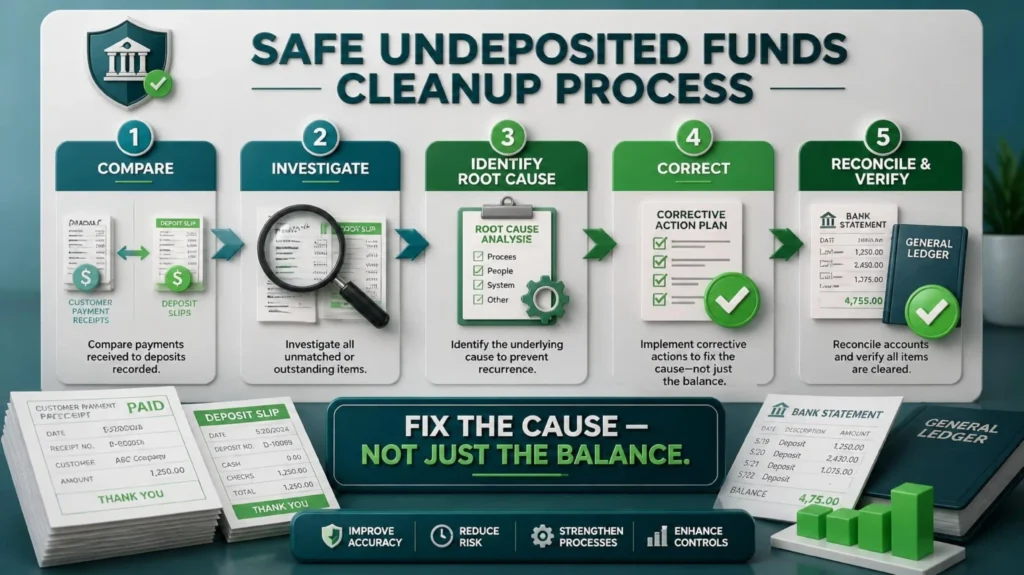
The goal of cleanup is not simply to make the balance zero. Each payment should be traced to the related customer transaction, deposit, bank statement, or payment-processor record so the books reflect what actually happened.
1 What Should an Undeposited Funds Balance Represent?
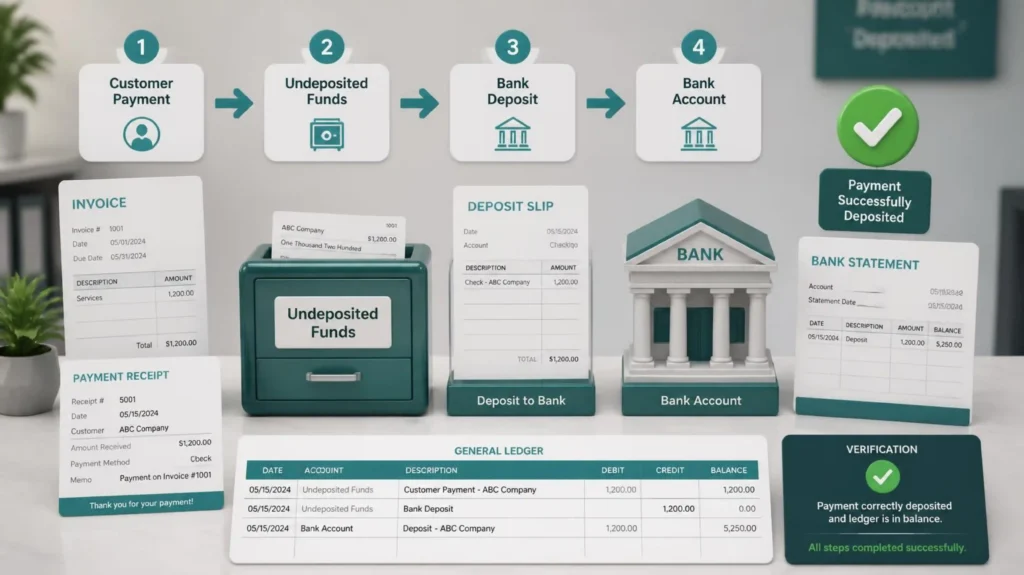
Think of Undeposited Funds as a temporary holding area for money that the business has received but has not yet recorded as deposited into its bank account.
For example, suppose a customer pays a $2,000 invoice.
The customer payment is received and recorded in the accounting system, but the money has not yet been included in a bank deposit.
The accounting flow may look like:
Customer Payment: $2,000 → Undeposited Funds: $2,000
Later, the business deposits that money into its bank account.
The deposit should then move the amount from Undeposited Funds to the appropriate bank account:
Undeposited Funds: $2,000 → Bank Deposit: $2,000
After the payment has been correctly included in the deposit, the related amount should no longer remain in Undeposited Funds.
For example:
Customer Payment: $2,000
Bank Deposit: $2,000
Undeposited Funds: $0
However, if the payment was recorded directly to the bank account, duplicated, deposited without properly grouping the payment, or never matched to the actual bank deposit, Undeposited Funds may show an incorrect balance.
A reliable Undeposited Funds balance should be supported by customer payments, deposit records, bank statements, and the relevant Accounts Receivable activity.
2. Common Causes of Incorrect Undeposited Funds Balances
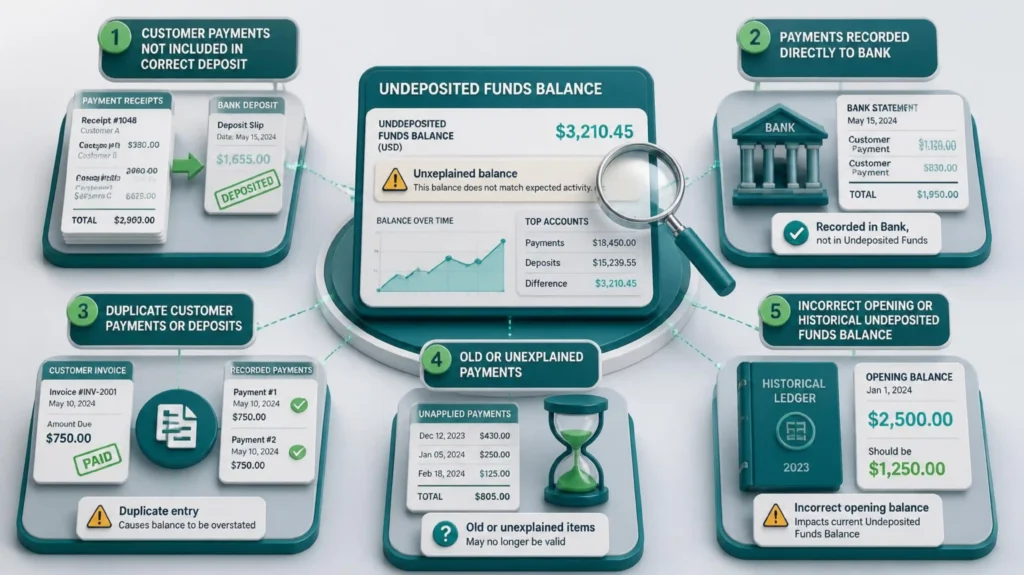
1 — Payments Were Recorded but the Actual Bank Deposit Was Never Created
A payment may be recorded correctly while the corresponding bank deposit was never created in the accounting system. The payment can therefore remain in Undeposited Funds even though the money may already have reached the bank.
Cleanup approach: Review Undeposited Funds detail and compare payment dates and amounts with bank statements and deposit records. Trace each payment to the real deposit before correcting it.
2 — Deposits Were Entered Directly to Income Instead of Using the Original Payments
A separate deposit may be posted directly to an income account even though the customer payment was already recorded. This can create duplicate activity and may overstate income.
Cleanup approach: Trace the bank deposit back to the underlying customer payment(s). If a duplicate income transaction exists, correct it according to the supporting records and the established bookkeeping workflow.
3 — Multiple Payments Were Combined Into One Bank Deposit
Several customer payments may be deposited together. If those payments are not grouped into the same deposit in the books, individual payments can remain in Undeposited Funds even though the bank shows one combined deposit.
Cleanup approach: Compare the bank deposit with individual customer payments around the same date. Identify the combination that makes up the actual deposit and confirm the final amount.
4 — Old or Unidentified Payments Are Sitting in the Account
Old entries may remain because the original payment cannot immediately be connected to a deposit, customer, or bank transaction. These items can make the balance look larger than the amount genuinely waiting to be deposited.
Cleanup approach: Review old entries first and investigate customer records, bank statements, deposit slips, merchant reports, and other supporting documentation. Do not clear old items simply to make the account zero.
5 — Bank, Merchant, or Payment-Processor Deposits Do Not Match the Recorded Payments
Payment processors may combine payments, deduct fees, issue refunds, or settle on a different date. The net amount reaching the bank can therefore differ from gross customer payments.
Cleanup approach: Review processor reports, settlement statements, bank deposits, payments, fees, and refunds. Reconcile the gross activity to the net bank deposit instead of forcing Undeposited Funds to zero.
3. How to Investigate an Incorrect Undeposited Funds Balance
Do not immediately post a journal entry just because the Undeposited Funds balance looks wrong.
First determine what created the balance.
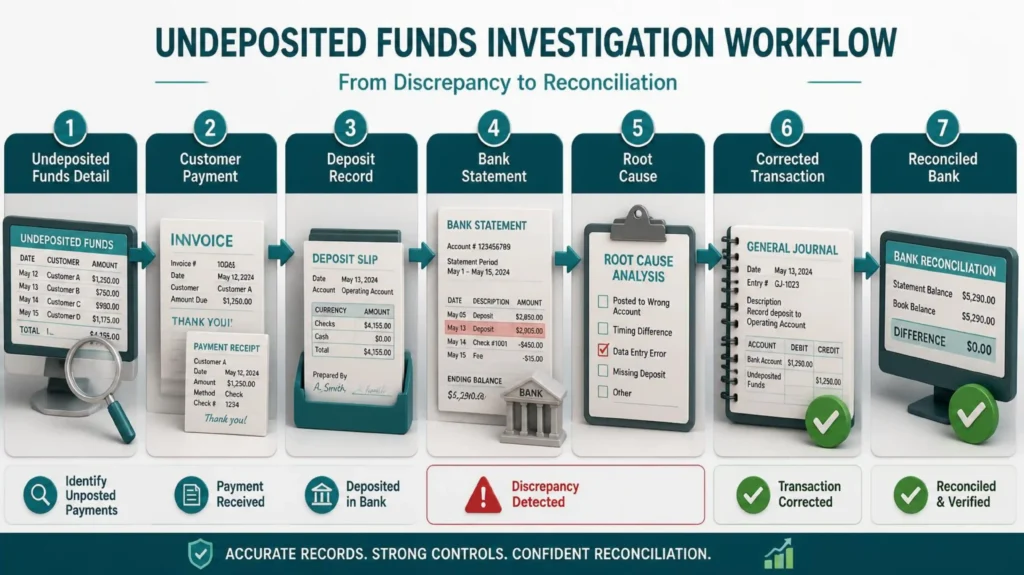
A systematic investigation should include:
⦁ Run the Undeposited Funds account detail for the relevant date.
⦁ Identify old, unusual, or unexplained payment transactions.
⦁ Review customer payment records.
⦁ Compare payment dates and amounts with bank deposits.
⦁ Review the bank statement for corresponding deposits.
⦁ Check whether multiple customer payments were grouped into one bank deposit.
⦁ Look for payments recorded directly to the bank account.
⦁ Check for duplicate payments or duplicate deposits.
⦁ Review transactions around the conversion or opening date.
⦁ Trace unusual balances back to supporting customer and bank records.
⦁ Document the root cause before making a correction.
⦁ After the correction, rerun the Undeposited Funds detail and review the bank reconciliation.
4. How to Fix the Problem Safely
The correct fix depends on the cause.
There is no universal journal entry that should be used for every Undeposited Funds discrepancy.
If a customer payment was not included in the correct deposit
Verify the customer, payment amount, payment date, and bank deposit.
If the money was actually deposited, correct the deposit so the customer payment is properly included in the appropriate bank deposit.
If the payment was recorded directly to the bank account
Determine whether the direct bank transaction represents the actual customer payment or whether it duplicates another payment transaction.
Correct the underlying transaction so the customer payment and bank activity represent the same economic event only once.
If a payment is duplicated
Confirm the duplicate using customer records, payment references, and bank evidence.
Then remove, void, or reverse the duplicate according to the appropriate bookkeeping workflow
If a deposit is duplicated
Compare both deposits against the bank statement.
If only one actual deposit occurred, correct the duplicate accounting transaction rather than creating another adjustment to offset it.
If an old payment remains in Undeposited Funds
Investigate why the payment is still outstanding.
Determine whether it was eventually deposited, recorded elsewhere, refunded, reversed, or entered incorrectly.
Do not simply delete the transaction because it is old.
If the opening Undeposited Funds balance is wrong
Trace the balance to the prior accounting file and historical payment/deposit records.
Identify the source of the difference and correct the underlying opening or historical issue with appropriate documentation.
5.Undeposited Funds in QuickBooks: Why Payments Remain and How to Fix Them
Do not force Undeposited Funds to zero by posting an unexplained journal entry.
Do not delete customer payments simply because they have been sitting in Undeposited Funds for a long time.
Do not create another bank deposit simply because a customer payment is still showing in Undeposited Funds.
Do not record the same customer payment twice just to make the deposit match the bank statement.
Do not assume that an Undeposited Funds mismatch is always a bank-feed problem.
Do not delete old transactions without determining what actually happened to the money.
Do not create multiple adjustment entries until the original cause is understood.
Do not close the issue without documenting the source of the corrected balance.
Is money sitting in Undeposited Funds month after month? Proper cleanup can help identify missing deposits, duplicate entries, unmatched payments, and reconciliation issues—so your books reflect what actually happened.
Is money sitting in Undeposited Funds and you’re not sure why?
Let Accounting Touch help review and clean up your books.